
If you live or work in Qatar, your Qatar ID (QID) is the single most important document you will carry. Banks need them. Hospitals need them. Government offices need them. And if it expires or shows an invalid status on the MOI system, things stop working fast.
A lot of residents get caught off guard because they never actually checked their QID status until it was already expired. This guide fixes that. Below you will find the complete Qatar ID Check process for 2026, using the official MOI portal and the Metrash app. You can check by your 11-digit QID number or by your passport number. Both methods are explained step-by-step in simple terms.
Advertisements
We have also covered exactly what happens when your QID expires, how to easily renew it, how much it officially costs, and what to do if your physical card gets lost. Knowing these simple residency rules helps you avoid heavy fines and keeps your legal status completely secure.
What Is a Qatar ID (QID) and Who Needs It?
Qatar ID is officially called Qatar National Identity Card or Residence Permit (RP) for expats. It is issued by the Ministry of Interior (MOI). Every person living in Qatar legally needs one. That includes Qatari citizens, expat workers, family dependents, domestic staff, students, and business owners.
The card holds your full name, date of birth, nationality, expiry date, photographs, and your unique 11-digit QID number. For expats, sponsor information is also printed on it. Modern cards come with a built-in chip that stores biometric data like fingerprints and facial scans, which is used for e-government services and identity verification.
The 11-Digit QID Number and What It Means
The number on your card is not random. It follows a specific structure.
- First digit: Indicates birth century. “2” means born between 1900 and 1999. “3” means born in 2000 or later.
- Next two digits: Your year of birth. For example, “90” means born in 1990.
- Nationality code: A few digits linked to your country of origin.
- Unique serial number: The remaining digits make your number unique across the system.
This number appears on your QID card front side and is linked to every government system in Qatar, from driving licenses to health cards to traffic records.
Types of Qatar ID Issued to Residents
- Work-Sponsored Residence Permit: The most common type. Your employer is your sponsor and handles most of the paperwork.
- Family-Sponsored Residence Permit: For spouses and dependent children of residents.
- Investor or Business Residence Permit: For business owners and registered investors in Qatar.
- Golden Visa: A long-term residency option for qualified investors and professionals. No employer sponsor is needed.
Method 1: Qatar ID Check on the MOI Portal
The official Ministry of Interior website is the easiest way to check your QID status. No login or an account is required. You just visit the portal, enter your details, and the results are on screen in seconds.
How to Check QID Status Using Your QID Number
Step 01: Open your browser and go to the official MOI portal.
Step 02: Choose your language at the top of the page. English and Arabic are both available.
Step 03: Click on the “Inquiries” icon on the homepage. It looks like a magnifying glass.
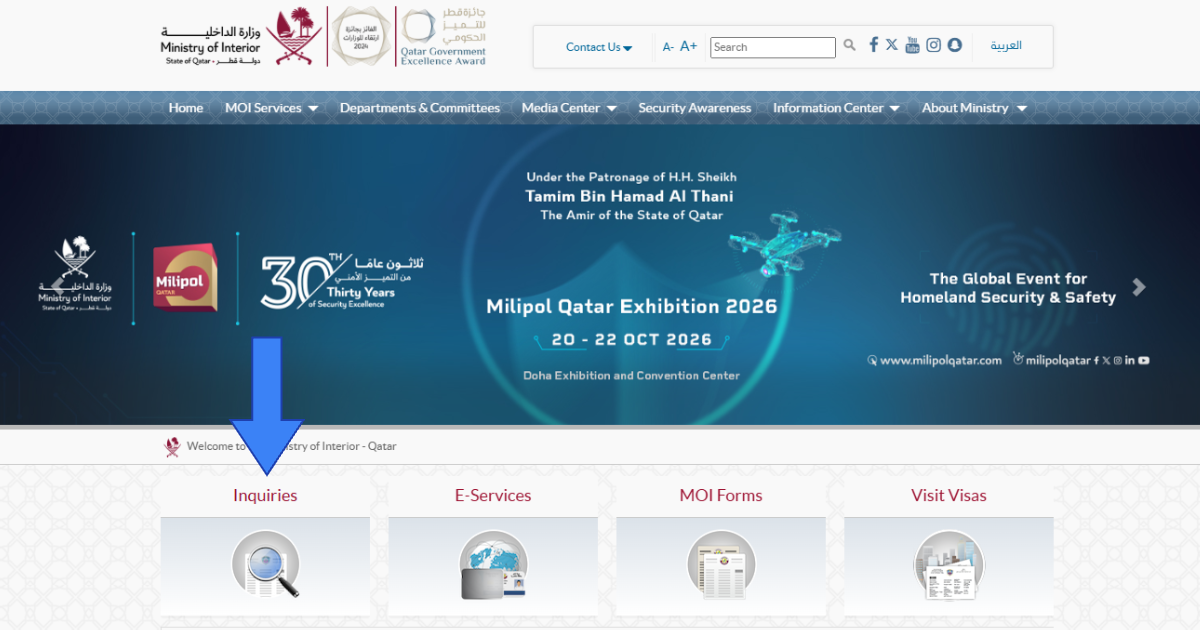
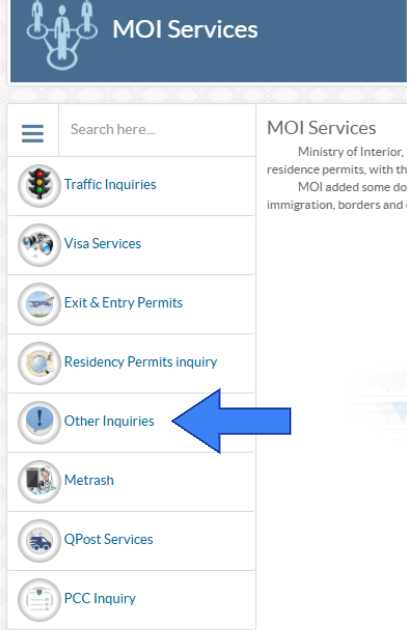
Step 04: From the menu that opens, select “Other Inquiries.”
Step 05: Click on “Official Documents.” This is represented by a Qatari passport icon on the page.
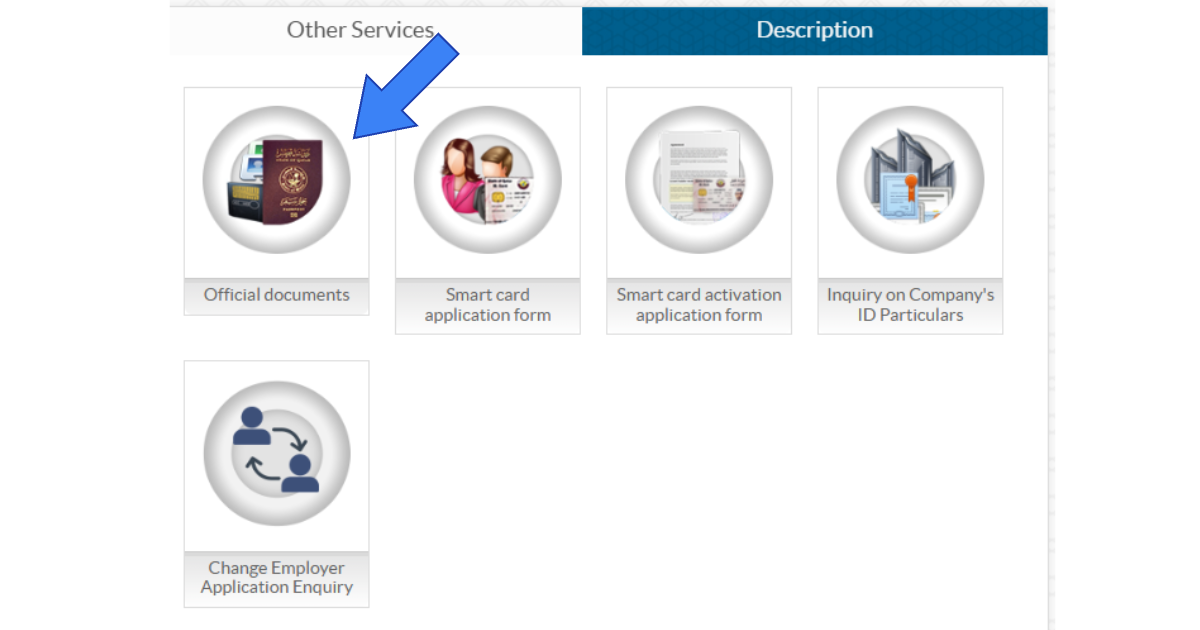
Step 06: Enter your 11-digit QID number exactly as printed on the front of your card.
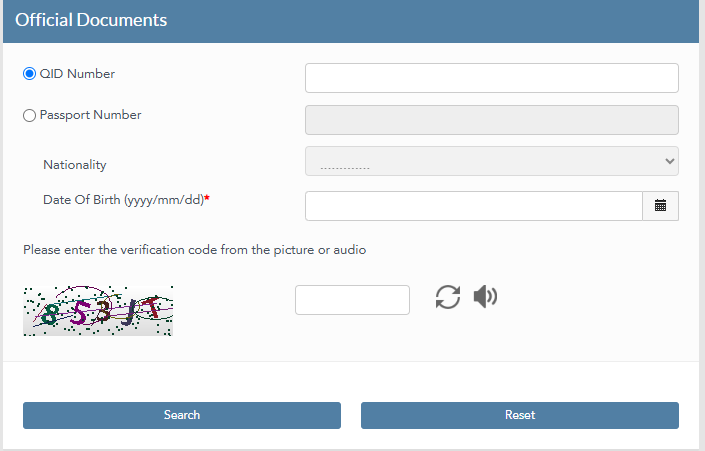
Step 07: Select your ‘Nationality’ and enter your ‘Date of Birth.’
Step 08: Type in the Captcha code shown on the screen.
Step 09: Click “Search.” Your QID validity and expiry date will appear right away.
How to Check QID Status Using Your Passport Number
If you do not have your QID card with you, the passport number method works just as well. Here is how:
Step 01: Go to www.moi.gov.qa and click on “Inquiries.”
Step 02: Select “Other Inquiries” and then click “Official Documents.”
Step 03: On the next screen, enter your passport number and choose your nationality from the dropdown list.
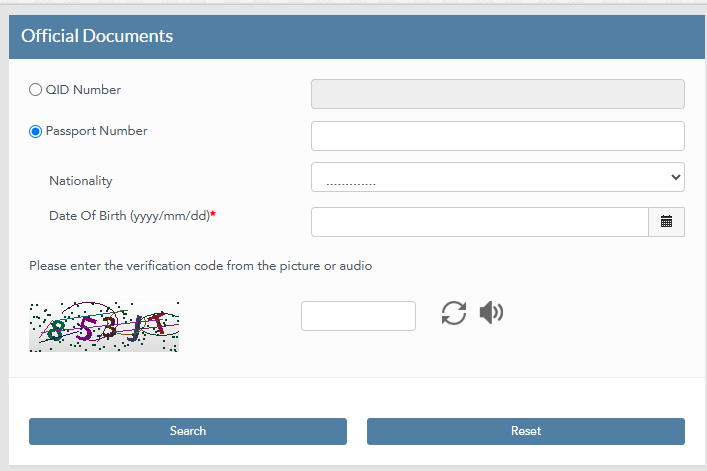
Step 04: Enter the verification code (Captcha) shown on the page.
Step 05: Click “Search” and your QID status will be shown on the screen.
Understanding the Result: What Each Status Means
Once you search, the portal will show one of the following statuses:
- Valid: Your QID is active. You can use all services normally.
- Expired: Your card has passed its expiry date. Renewal is needed right away.
- Ready for Collection: Your QID has been printed. Go pick it up from the MOI service center.
- Under Process: Your application or renewal is still being reviewed by MOI.
- Application Approved: MOI has approved it. Your card will be printed shortly.
- No Data Found: The details you entered were likely incorrect. Check your QID number and try again.
- Invalid: There could be a sponsorship issue, data mismatch, or system problem. Visit an MOI service center to resolve this in person.
Method 2: Qatar ID Check via the Metrash App
For most residents, the Metrash app is the easiest option. The 2025 updated version of the app has replaced the older Metrash2. It lets you check your QID status, renew your card, pay fees, and store a digital copy of your ID. Everything is in one place on your phone.
Check Your QID Status on Metrash
Using the official mobile application is the absolute fastest way to verify your official residency details from anywhere at any time. Just follow these simple instructions below to easily find your exact validity period in exactly 2 minutes.
Step 01: Download and install the official Metrash app directly from your mobile application store.
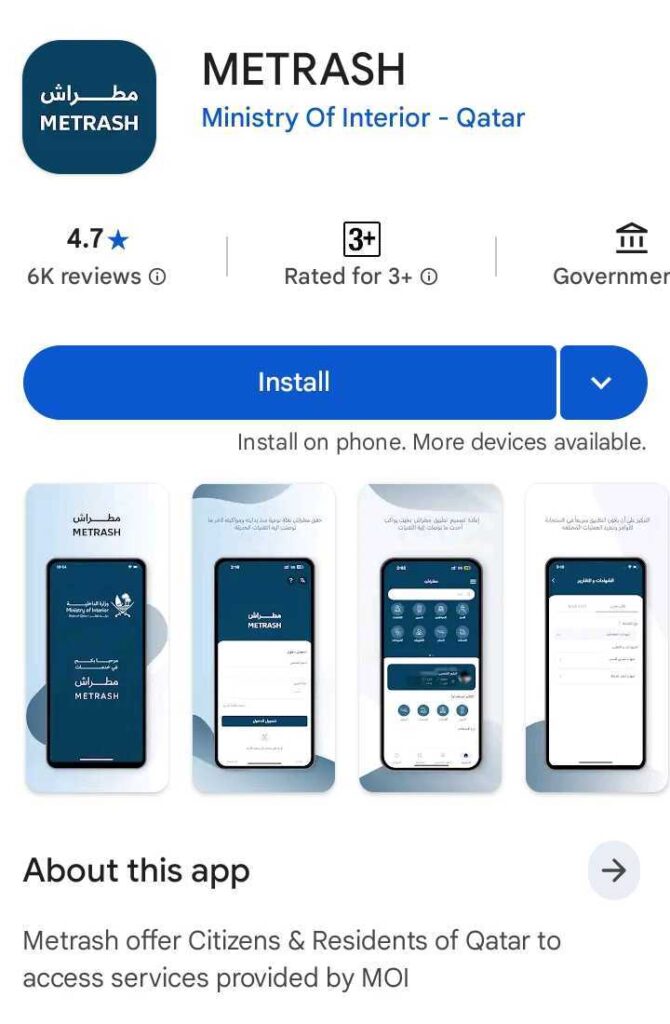
Step 02: Open the application and simply log in, or create a brand new account using your 11-digit QID number and your registered phone number.
Step 03: From the main application menu, tap directly on the ‘Inquiries’ section.
Step 04: Select the ‘ID Card Inquiry’ option from the available menu.
Step 05: Type your exact 11-digit QID number to instantly view your complete validity status and official expiry date right on your screen.
Method 3: MOI Qatar ID Check by SMS
You can check your exact validity period instantly through the official messaging service. It will take exactly one minute for you to receive your complete QID status directly to your phone.
Step 01: Open the standard messaging application on your mobile phone.
Step 02: Type your exact 11-digit QID number clearly in the blank message box.
Step 03: Send this quick message directly to the official MOI number which is 92992 from your registered local network.
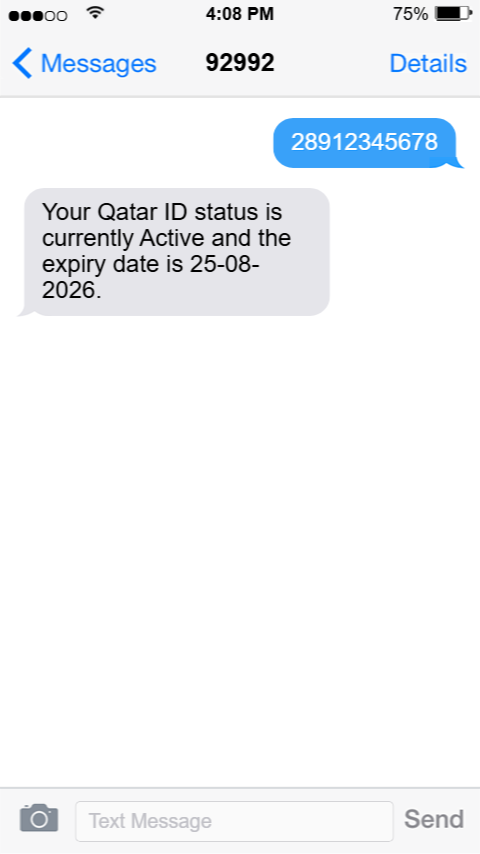
Step 04: You will instantly receive an official reply showing your current active status and exact expiry date right on your screen.
Method 4: In-Person Check at an MOI Service Center
If the online portal is giving you errors or your status shows something unclear, like “Invalid,” the best move is to visit an MOI Service Center or the Expatriate Affairs Department in person. A staff member will check your status on the spot and tell you exactly what needs to be done.
Bring your physical QID or passport along with any supporting documents. In-person visits are also the fastest way to resolve sponsorship issues, biometric updates, or data mismatches that cannot be fixed through the portal.
What Happens When Your Qatar ID Expires?
Qatar takes QID validity seriously. Once your card expires, things can go wrong very quickly. Many services stop automatically from the moment expiry kicks in. Even being just one day late can cause problems.
- Daily fines: A fine of QAR 10 per day is charged from the day of expiry.
- Service restrictions: Hospitals, banks, and government offices will not process your requests.
- Bank account issues: Financial institutions may freeze your account if your QID has expired.
- Employment problems: Your employer cannot renew your work contract while your QID is expired.
- Travel restrictions: Getting back into Qatar after travelling abroad can become complicated.
The good news is that there is a 90-day grace period after expiry. You can still renew during this window without facing major legal action. But the QAR 10 per day fine keeps adding up throughout this period. Renewing early costs much less and saves a lot of headaches.
For residents living in the UAE, keeping your Emirates ID status perfectly active is incredibly important for daily life. You can also quickly verify your complete UAE visa status online to keep all your official documents totally updated without any trouble.
Qatar ID Renewal in 2026: Step by Step, Fees, and Documents
After checking your QID status, if you find that renewal is coming up soon, it is better to start early. The process has been made much easier in 2026 with online options through both the MOI portal and the Metrash app.
When Should You Start Renewal?
You can apply for renewal up to 3 months before your QID expiry date. The full process from submitting your application to receiving your new card usually takes 2 to 4 weeks. Medical test results take 1 to 3 days, biometric registration takes one day, and MOI approval can take 1 to 3 weeks after that. Waiting until the last week is asking for trouble.
One important rule: Your passport must have at least 6 months of validity remaining when you submit a renewal. If your passport is close to expiry, renew it first.
How to Renew Qatar ID via Metrash App
Step 01: Open the Metrash app and login.
Step 02: Tap on “QID Service” from the main menu.
Step 03: Select “Residency” and then tap “Residency Renewal.”
Step 04: Enter your 11-digit QID number.
Step 05: Choose your renewal period. You can select 1 year or 3 years.
Step 06: Review the fees shown on screen and pay online using a credit or debit card.
Step 07: Choose delivery by Q-Post (home delivery) or select to collect your new card personally from MOI.
Qatar ID Renewal Fees 2026
| Resident Type | 1 Year Fee | 3 Year Fee | Delivery Fee |
| Expat Worker | QAR 500 | QAR 3,000 | QAR 20 via Q-Post |
| Domestic Worker | QAR 300 | QAR 900 | QAR 20 via Q-Post |
| Company Sponsored | Employer pays | Employer pays | QAR 20 via Q-Post |
| Family Sponsored | Sponsor pays | Sponsor pays | QAR 20 via Q-Post |
| Free collection | No delivery fee | No delivery fee | Pick up at MOI center |
Home delivery via Q-Post costs an extra QAR 20. If you collect in person from the MOI Expatriate Affairs Department, that delivery fee does not apply. For 3-year renewals, some categories get a discount, so it is worth selecting the longer period if your situation allows it.
Documents You Need for Renewal
- Valid passport with at least 6 months remaining and Qatar’s residence visa stamped in it.
- Your current Qatar ID card
- Completed MOI application form (available at MOI service centers)
- Recent passport-sized photos meeting MOI specs: 35x45mm, blue background for expats
- Medical certificate in some cases, depending on your residency category.
Note: Workers cannot renew their own QID. Only the sponsor or employer can initiate renewal for workers and their family dependents. If you are on a company visa, speak to your HR team or PRO well before the expiry date.
Residents in the UAE can easily complete their Emirates ID renewal on time to keep all their official documents perfectly active without paying any late fees.
Common Problems When Checking Qatar ID and How to Fix Them
These are the most common issues people run into during a Qatar ID check, along with what to do about each one:
| Problem | Likely Cause | Fix | Next Step |
| No Data Found | Wrong QID or passport number entered | Click Reset and re-enter correctly | Search again on MOI portal |
| Invalid Status | Sponsorship or data mismatch | Visit MOI service center in person | Bring passport and current QID |
| System Error | High traffic or site maintenance | Wait a few minutes and try again | Switch to Metrash app |
| Biometric Incomplete | Chip data not updated | Visit MOI to update fingerprints | Check status again after update |
If your issue is not resolved through the portal or app, visit the Expatriate Affairs Department in person. This almost always speeds things up. Many rejections and delays come from incomplete application forms or details that do not match your passport and the QID system. A staff member can identify the exact issue on the spot.
Qatar ID and Traffic Fines: What You Need to Know
This is something many residents do not think about until it causes a problem. Having pending traffic violations in Qatar can hold up your QID renewal and block access to certain MOI services. Before you go in for renewal, it is worth checking and clearing any outstanding fines first.
You can easily clear any pending penalties online by doing a quick Qatar traffic violation check directly through the official portal.
For new applications, you can also perform a simple Qatar visa check by passport number to instantly verify your exact approval status in just 1 minute.
What to Do If You Lose Your Qatar ID
Losing your QID needs to be dealt with quickly. Here is what to do:
- Report the lost card through the Metrash app by navigating to ‘Residency Services’ and selecting “Replace Lost or Damaged ID Card.” Alternatively, go to an MOI service center directly.
- File a police report for the lost card. You will need this for the replacement application.
- Pay the replacement fee of approximately QAR 100 to 200 plus QAR 20 if you want home delivery.
- Complete biometric registration again if the MOI system requires it.
Your QID number stays the same on the replacement card. Only the physical card is new. The process usually takes a few working days once the police report and payment are submitted.
Those in the UAE facing a similar situation can easily replace their lost Emirates IDs by following the official procedure.
Quick Tips to Stay on Top of Your Qatar ID
- Always use the MOI Qatar portal only. Third-party websites that offer ID checking services may not be secure and could put your personal data at risk.
- Enter your QID number carefully. One wrong digit gives you a “No Data Found” result, and you will need to start over.
- Start renewal at least 3 months early. Processing takes up to 4 weeks, and you do not want to be scrambling as the deadline approaches.
- Keep the Metrash app installed. It is the fastest way to check your status on the go, and stores your digital QID in the app wallet.
- Watch your passport validity too. MOI will not process a QID renewal if your passport has less than 6 months remaining.
- If you are company-sponsored: Let your HR team or PRO officer know about the upcoming renewal well in advance. They handle the process on your behalf and need time to prepare the paperwork.
Frequently Asked Questions
How do I check my Qatar ID status online?
Go to the official MOI Qatar portal and click on Inquiries, then Other Inquiries, then Official Documents. Enter your 11-digit QID number or passport number, complete the Captcha, and click Search. You can also do this through the Metrash app by tapping on Inquiries and then ID Card Inquiry.
Can I check my QID using only my passport number?
Yes. On the MOI portal, after clicking Other Inquiries and then Official Documents, you will see an option to enter your passport number and select your nationality. Complete the Captcha and click Search to see your QID status.
What fine do I get for an expired Qatar ID?
The fine is QAR 10 per day from the date of expiry. There is a 90-day grace period but fines still accumulate every day during that window. The earlier you renew, the less you pay in fines.
How long does Qatar ID renewal take in 2026?
The full process typically takes 2 to 4 weeks. Medical tests take 1 to 3 days, biometric registration is done in one day, and MOI approval takes between 1 to 3 weeks after submission.
Do children in Qatar also need a QID?
Yes. All residents in Qatar, including children, must hold a valid QID. For newborns, the sponsor (father or mother) applies using the birth certificate, baby’s passport, recent photos, and parents’ QIDs.
Who pays for the Qatar ID renewal fee?
For company-sponsored workers, the employer typically covers the renewal fee. For family-sponsored dependents, the sponsor pays. Self-employed residents and Golden Visa holders manage and pay for their own renewals.
Can I renew my Qatar ID while outside Qatar?
No. Renewal must be submitted from inside Qatar. You need to be physically present in the country, as biometric data may need to be updated during the process.
What does “Invalid” mean on the MOI portal?
An “Invalid” status usually means there is a sponsorship issue, a data mismatch, or a system error. It cannot be resolved online. Visit an MOI service center or the Expatriate Affairs Department in person with your passport and current QID.
Is the Metrash app free to use?
Yes, the Metrash app is free to download and use. It is available on both Google Play Store and Apple App Store and is the official MOI Qatar mobile app.

Haris Khan is the lead content expert at TheEmiratesGuides.com, where he oversees the documentation of UAE visa processes, employment opportunities, and government services. With a commitment to factual integrity and real-time updates, he provides the technical expertise necessary to guide readers through the complexities of life and work in the UAE.