
Have you ever inserted a new SIM card into your phone and completely forgot your own mobile number right when someone asked for them? This common situation happens to everyone especially when you have just arrived in the UAE or bought a fresh tourist connection. Sometimes you might even find an old spare chip in your drawer and start wondering How to Check Du Number Owner Without Balance just to figure out whose identity card is linked to it.
Getting stuck in this confusion with absolutely zero prepaid credit makes things even more frustrating. Thankfully you do not need to worry at all because we have tested several completely free tricks that will display your active digits on your screen instantly.
Advertisements
Top Methods to Find Your Du SIM Number
Here we have defined all the working and practical ways to find your active Du mobile number easily without any hassle. You can choose any of these proven techniques depending on whether you have a smartphone, a basic mobile, or a Wi-Fi connection. Every method is completely free and works instantly for all prepaid and postpaid users across the UAE.
| Checking Method | Quick Steps To Follow | Major Advantage | Potential Drawback |
| Official Application | Log into the digital portal | Gives full account control | Requires active internet |
| Direct USSD Code | Dial *116# on your keypad | Very fast and completely free | SIM must be inside the phone |
| Original Packaging | Read the printed back label | Works entirely offline | You might have lost the box |
| Emergency Request | Dial 108YourNumber# | Sends free text without balance | Needs someone else nearby |
| Internal Device Settings | View the about phone menu | Checks directly on your device | Fails if SIM is completely dead |
| Customer Helpline | Dial 155 to speak with agent | Perfect for complex network issues | Takes time to reach a human |
Using the Official Du App and Website
Smartphone and computer users can easily manage their entire account by logging into the company platforms via the internet. These digital portals act as a complete dashboard for your daily telecommunication needs.

- Download the official mobile application or simply visit the main Du website and login to view your profile details.
- Your screen will display your active number directly on the home page where you can also find out how to check Du balance and recharge online very easily.
Dial the Zero Balance USSD Code
The absolute fastest and free way to see your digits on screen is using the official quick dial code. This specific Du number check code works perfectly even if your prepaid credit is entirely zero. Simply follow these quick steps:
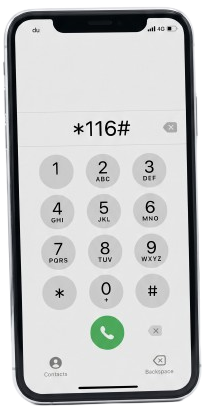
- Open the calling pad on your mobile phone.
- Dial *116# and press the green call button.
- Wait a few seconds for a flash message to pop up.
- See your active number displayed clearly on your screen.
Send a Free Call Me Back Request
You can smartly use the free emergency contact service to send your digits directly to a friend. This is highly useful when you have zero balance but need someone else to save your contact immediately.
- Dial 108 followed by a friend’s mobile number and end with a # symbol.
- For example: Dial 1080551234567# and press the call button.
- Your friend will instantly receive a free automated text message containing your exact Du mobile number.
Call the Toll Free Customer Helpline
Connecting with the official telecom support team is completely free from your own network connection. This method is extremely helpful if USSD codes are facing a temporary network glitch in your area.

- Dial 155 from your mobile device to reach the automated voice response system without any charges.
- Choose your preferred language like English or Arabic.
- Ask the live customer service representative to read out your assigned digits directly to you.
- You can also ask them to guide you to the nearest Customer Happiness Center if you are facing any physical SIM card issues.
Check Your Phone Settings Menu Offline
Modern smartphones often save your mobile number automatically in the internal device settings without needing credit. This is a built-in feature for both Android and iOS devices that requires absolutely no network signal.
- Open your mobile configuration menu and navigate straight to the ‘About Phone’ option.
- Look for the SIM status or Network tab.
- You will find your active number displayed clearly for free.
Inspect Your Original Du SIM Card Kit
Your physical starter pack contains all the official registration details without requiring any network connection. It is always a good idea to keep this kit safe after purchase.
- Find the large plastic card where your original chip was securely attached.
- Read the printed label on the back.
- You will find your officially assigned digits written right above the barcode.
How to Check Du Balance and Active Offers
Keeping track of your expenses helps you manage your monthly telecommunications budget effectively. You can easily monitor your remaining prepaid credit and active data packages by using a quick code from your mobile phone. This ensures that you never run out of balance during an important call. Dial *135# directly from your keypad to see your remaining prepaid balance instantly.
Essential Details on Du SIM Registration
The UAE government requires all telecommunication profiles to be linked securely with valid identity documents. It is very important to keep your residency details updated to avoid any sudden service suspension. The official portal makes this process very smooth for all prepaid and postpaid users.
- Ensure your residency card is fully updated through the official Du SIM online registration portal.
- Completing the Du Etisalat Emirates ID update process on time ensures your mobile connection stays active without any network interruptions.
Get Help from a Customer Happiness Center
Sometimes digital methods or USSD codes might fail due to a network glitch or a damaged chip. In such cases physical branches provide instant solutions and face-to-face support. You can simply walk into the nearest customer happiness center to replace a lost SIM card or resolve any complex account ownership issues directly with an official representative. They will guide you through the entire recovery process securely.
Official Regulations on Telecommunication Data
The Telecommunications and Digital Government Regulatory Authority protects user privacy strictly across the entire country. You might be wondering how to check du number owner without balance but you cannot publicly find these personal details due to strict local privacy laws protecting consumers. No public directory exists that shares personal names against mobile digits. You can visit the official TDRA website to read more about your consumer privacy rights and official regulations.
Conclusion
Knowing exactly how to check Du number quickly saves you from unnecessary stress when you need to share your contact details urgently. Whether you choose to dial Du number check code *116# or use the official mobile application you will always have access to your assigned digits within seconds. Always make sure to keep your identity documents updated and save your physical starter pack for future reference.

Haris Khan is the lead content expert at TheEmiratesGuides.com, where he oversees the documentation of UAE visa processes, employment opportunities, and government services. With a commitment to factual integrity and real-time updates, he provides the technical expertise necessary to guide readers through the complexities of life and work in the UAE.